
Automatic FAQ schema for WordPress and WooCommerce
Happy FAQs adds FAQPage schema to every page and product that shows FAQs, automatically. Every FAQ on a page goes into one schema block with duplicates removed, so it stays valid when the same question appears twice. It’s free and needs no SEO plugin.
Free on WordPress.org · Pro from $29.99/yr
What FAQ schema is
FAQ schema is structured data, usually JSON-LD, that labels each question on a page and its accepted answer. Search engines and AI assistants read it to understand your content as clean question-and-answer pairs instead of guessing from the layout. For a page with two FAQs, Happy FAQs prints something like this:
{
  "@context": "https://schema.org",
  "@type": "FAQPage",
  "mainEntity": [
    {
      "@type": "Question",
      "name": "How long does shipping take?",
      "acceptedAnswer": {
        "@type": "Answer",
        "text": "Orders ship within 1 business day…"
      }
    },
    {
      "@type": "Question",
      "name": "What is your return policy?",
      "acceptedAnswer": { "@type": "Answer", "text": "…" }
    }
  ]
}
What changed, and why it still matters
Since August 2023, Google shows FAQ rich results only for a small group of well-known government and health sites. Many FAQ plugins still promise “FAQ rich snippets in Google”; for most stores and blogs that no longer happens. We’d rather tell you that up front.
FAQ schema is still worth having for three reasons:
- Clear answers for AI search. Assistants and AI overviews look for direct answers to specific questions. Marked-up Q&A pairs are easy to read and quote.
- Better understanding of the page. Schema removes guesswork about which text answers which question, especially in accordions where answers are hidden until clicked.
- It costs nothing. With Happy FAQs it’s on by default and needs no upkeep.
What matters more than the markup is the content: real questions your customers ask, answered in two or three plain sentences.
What Happy FAQs does automatically
- Every page that shows FAQs gets FAQPage schema: FAQ pages, the help center, posts, and blocks, Elementor widgets, Divi modules or shortcodes on any page.
- WooCommerce products get schema for the FAQs in their product FAQ tab.
- One block per page. FAQs from different sections of the same page are collected and printed once, in the footer.
- Duplicates removed. If the same FAQ appears in a product tab and a sidebar, it’s listed once.
- Hidden FAQs still count. FAQs behind “Show more” stay in the schema and in search.
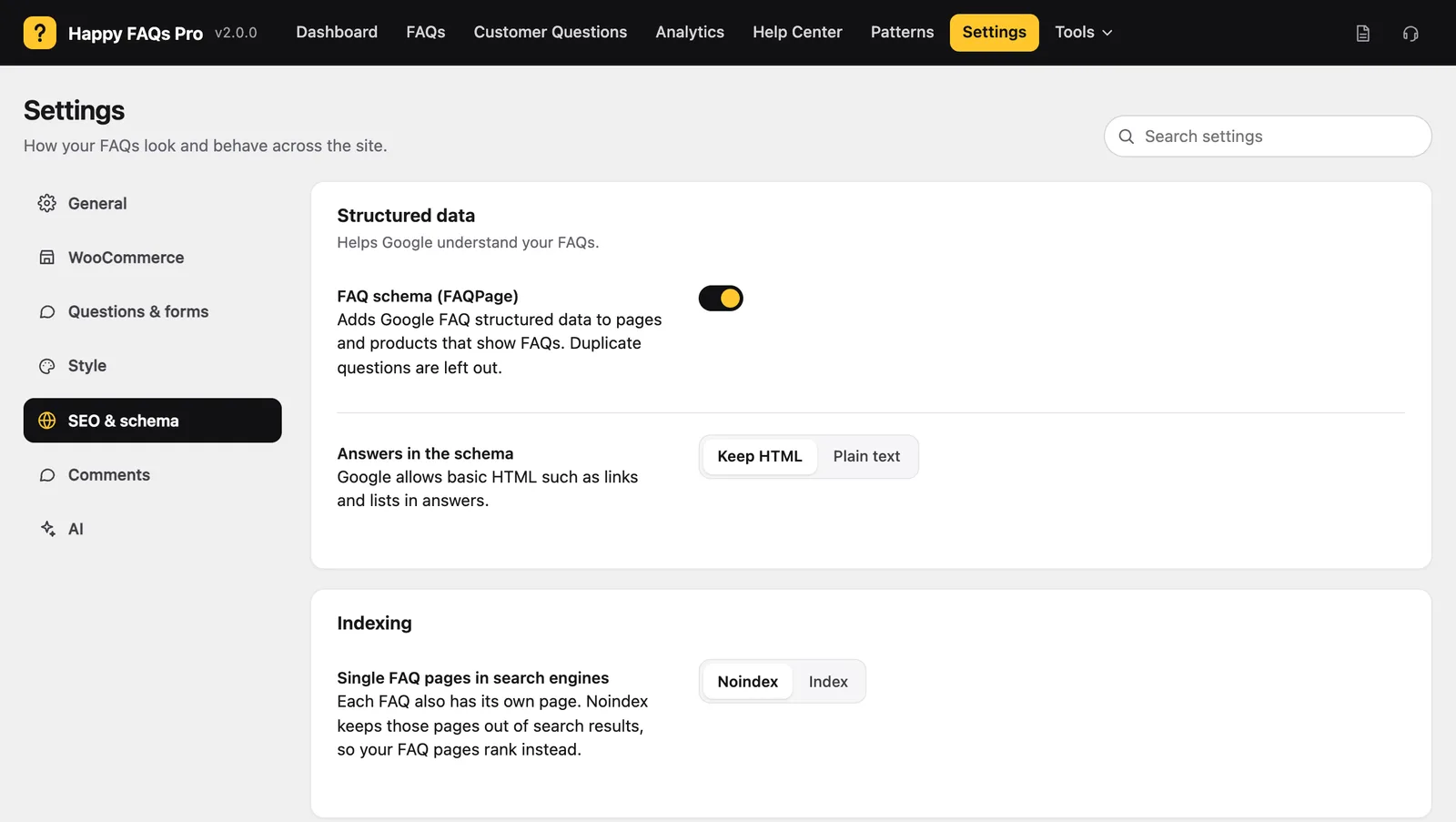
- Your choice of answer format: keep HTML, so links and lists survive, or plain text.
- Single FAQ pages: index them, or noindex them so your real FAQ pages are the ones that rank.
How to turn it on and test it
- Go to Happy FAQs → Settings → SEO & schema. FAQ schema (FAQPage) is on by default.
- Choose Keep HTML or Plain text for answers, and whether single FAQ pages should be indexed.
- Open a page with FAQs and paste its URL into Google’s Rich Results Test or the Schema.org validator. You should see one FAQPage with every question.
Step-by-step with screenshots: how to add FAQ schema.
Avoid duplicate FAQPage errors
Google’s tools report “Duplicate field FAQPage” when one page carries two FAQPage blocks. The usual cause is two sources adding their own: two FAQ plugins, or a FAQ plugin plus an SEO plugin’s FAQ block on the same page. Happy FAQs avoids this for everything it shows by merging into one block. If you also add a Yoast or Rank Math FAQ block to a page, keep only one of the two on that page.
Free vs Pro
All of the schema features above are in the free version. Pro adds more places FAQs can appear, such as nested FAQs inside answers and course and lesson FAQs, and those join the same single schema block.
How it compares
In our test of six FAQ plugins on WordPress 7, with default settings:
| Plugin | FAQPage schema |
|---|---|
| Happy FAQs | On by default, one merged block per page, duplicates removed |
| Ultimate FAQ | On by default (compare) |
| Helpie FAQ | On by default (compare) |
| Easy Accordion | A switch on each FAQ group, off on a new group (compare) |
| Lightweight Accordion | Optional, per accordion |
| Quick and Easy FAQs | None found |
SEO plugins like Yoast and Rank Math also have FAQ blocks with schema. They’re handy for one blog post, but each block lives on one page: there’s no shared FAQ library, no product FAQs and no help center.
Frequently asked questions
Is FAQ schema deprecated?
No. FAQPage is still a valid schema.org type and Google still reads it. What changed in August 2023 is that Google now shows FAQ rich results, the expandable questions under a search result, only for a small group of well-known government and health sites.
Is FAQ schema still worth adding in 2026?
Yes, as long as you know what it does now. It marks exactly which text is a question and which is its answer, which helps search engines and AI assistants read and quote your answers. It won’t usually give a store or blog the old FAQ snippet, so don’t choose a plugin for that alone.
Do I need an SEO plugin to add FAQ schema?
No. Happy FAQs adds FAQPage schema on its own to every page and product that shows FAQs. It works alongside Yoast SEO, Rank Math or All in One SEO, which keep handling the rest of your schema.
How do I fix the “Duplicate field FAQPage” error?
It means a page has more than one FAQPage block, often because two plugins or two FAQ sections each add their own. Happy FAQs merges every FAQ it shows on a page into one block. If you also use an SEO plugin’s FAQ block on the same page, remove one of them so only one FAQPage is left.
Does Happy FAQs add schema to WooCommerce product pages?
Yes. The FAQs in a product’s FAQ tab are added as FAQPage schema on that product page, next to the Product schema WooCommerce or your SEO plugin already outputs.
How can I check my FAQ schema?
Paste the page URL into Google’s Rich Results Test or the Schema.org validator. You should see one FAQPage item with every question on the page. Remember that a valid result doesn’t guarantee Google will show the rich result.
More of what Happy FAQs does
Or see everything in Happy FAQs, with Free vs Pro and pricing.
Try Happy FAQs free
Install it from WordPress.org in a minute. Upgrade to Pro only if you want analytics, product Q&A and store-wide FAQs.