
Write FAQs with AI, right inside WordPress
Happy FAQs includes a free AI FAQ generator for WordPress. Point it at a product, a page or a topic and it drafts questions and answers you can edit and save. On WordPress 7.0+ it uses the AI connection built into WordPress, so there’s no API key to paste.
Free on WordPress.org · Pro from $29.99/yr
Why generate FAQs inside WordPress
Online AI FAQ generators give you text to copy and paste. That’s fine for one page. For a store or a help center, the slow part is everything after the writing: putting each answer on the right product, keeping it consistent, and adding schema. Happy FAQs generates the FAQs where they’ll live, so a product’s FAQs are attached to that product the moment you save them, and they appear in your FAQ tab, help center and FAQ schema straight away.
How to generate FAQs with AI
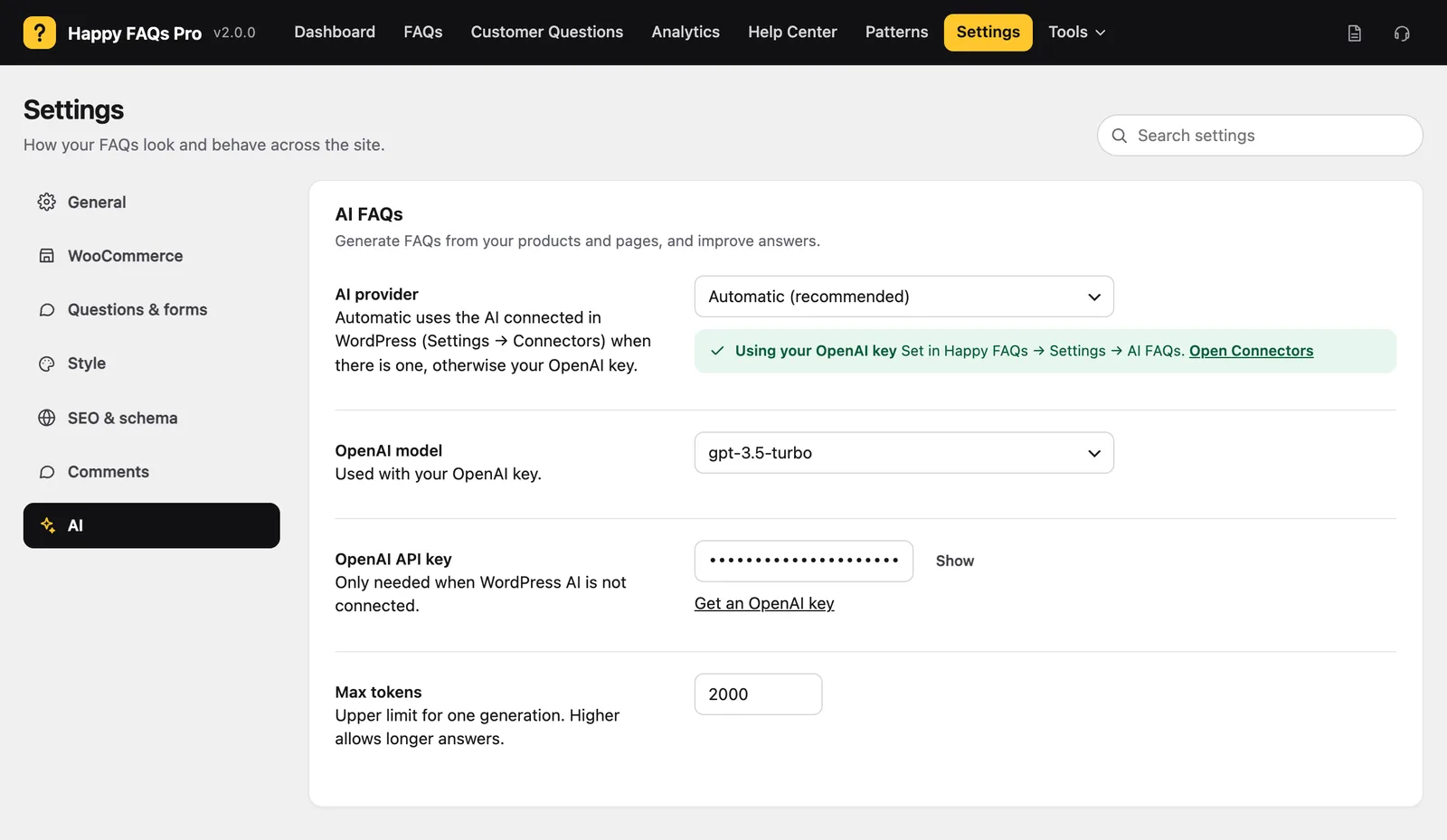
- Connect AI once. On WordPress 7.0+, go to Settings → Connectors and connect an AI provider. On older WordPress, paste an OpenAI key in Happy FAQs → Settings → AI.
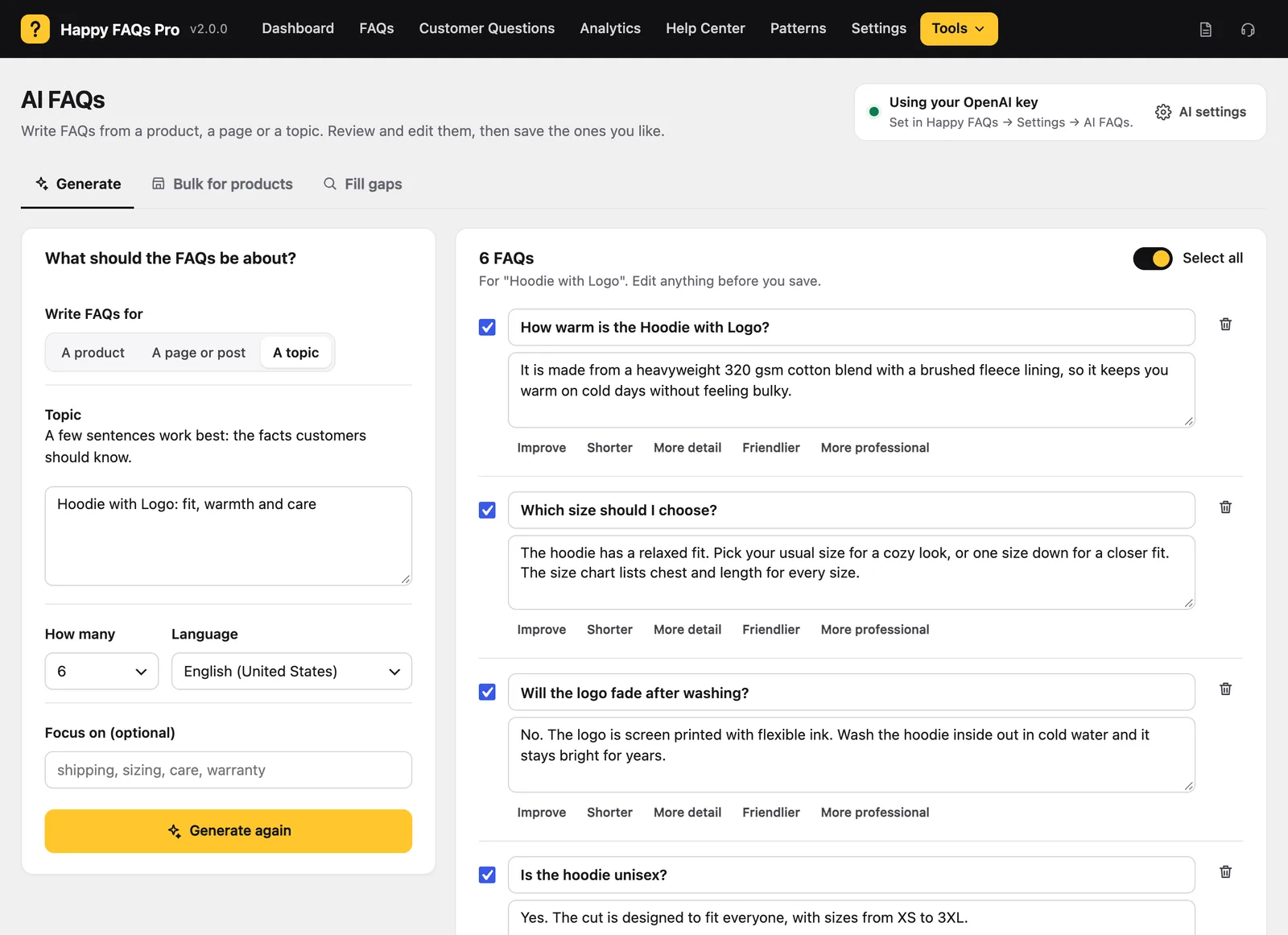
- Open Happy FAQs → Tools → AI FAQs and pick a source: a product, a page or post, or a topic you type.
- Choose how many FAQs and the language. Add an optional focus, like “sizing, care, delivery”.
- Click Generate FAQs, then review. Edit anything, untick what you don’t want, and save. Questions the product or page already answers are skipped, so you don’t get duplicates.
The full guide is in the docs: how to generate FAQs with AI.
Improve any answer with AI
AI isn’t only for new FAQs. In both the block editor and the classic editor, Improve with AI rewrites an existing answer: improve it, make it shorter, add more detail, make it friendlier or more professional. You see the new version before it replaces the old one.
Your AI provider, not ours
Happy FAQs has no AI service of its own and no account to create. It uses the provider you’ve connected in WordPress, or your own OpenAI key, and you choose which in AI provider: Automatic (WordPress AI, then your key), WordPress AI only, or OpenAI only. Your content goes straight to that provider, never through HappyDevs.
Tips for better AI FAQs
- Generate from the product, not a topic, for product FAQs. The AI reads the product’s own description and details, so answers fit that item.
- Use the focus field for what your support inbox actually gets: “returns from outside the US”, “gift wrapping”.
- Check facts before saving. AI writes fluent answers; only you know your real delivery times and policies.
- Keep answers short. Two or three sentences read better in an accordion and are easier for search engines and AI assistants to quote.
Free vs Pro for AI FAQs
| Feature | Free | Pro |
|---|---|---|
| Generate from a product, page or topic | ✓ | ✓ |
| Choose count, language and focus | ✓ | ✓ |
| Skips questions you already have | ✓ | ✓ |
| Improve with AI in the block and classic editors | ✓ | ✓ |
| WordPress AI (7.0+) or your own OpenAI key | ✓ | ✓ |
| Bulk drafts for up to 50 products a run | — | ✓ |
| AI drafts for searches that found no answer, using the product’s data | — | ✓ |
How it compares
From the FAQ plugins in our side-by-side test:
- Easy Accordion generates FAQs with Google Gemini, using an API key you create and paste in. Compare
- Ultimate FAQ needs no key, but the page text you choose is sent to the developer’s server, which passes it to OpenAI. Compare
- Helpie FAQ has no AI generator. Compare
Of the four, Happy FAQs is the only one whose free generator uses the AI connection built into WordPress itself. (Ultimate FAQ Premium uses it for its gap-filling drafts.)
Frequently asked questions
Is the Happy FAQs AI FAQ generator free?
Yes. Generating FAQs from a product, a page or a topic, and improving answers with AI, are in the free version on WordPress.org. Pro adds bulk generation for many products at once and AI drafts for the questions your visitors searched for but couldn’t find.
Do I need an OpenAI API key?
Not on WordPress 7.0 or newer. Happy FAQs uses the AI provider you connect once in WordPress under Settings → Connectors. On older WordPress, add your own OpenAI API key in Happy FAQs → Settings → AI. There is never a Happy FAQs key or account.
Where does my content go when I generate FAQs?
To the AI provider you set up in WordPress, or to OpenAI if you use your own key. It does not pass through HappyDevs servers. Only the product, page or topic you choose is sent, and only when you click Generate.
Will AI publish FAQs without my approval?
No. You see every question and answer first, can edit or improve each one, untick the ones you don’t want, and only then save. Nothing goes live on its own.
Can it write FAQs in other languages?
Yes. Choose the language before you generate, and the questions and answers are written in it.
Can AI write FAQs for all my products at once?
With Pro. Bulk for products writes draft FAQs for up to 50 products in one run, either products that have no FAQs yet or a whole category, and attaches each draft to its product for you to review.
More of what Happy FAQs does
Or see everything in Happy FAQs, with Free vs Pro and pricing.
Try Happy FAQs free
Install it from WordPress.org in a minute. Upgrade to Pro only if you want analytics, product Q&A and store-wide FAQs.