
How to turn on autocompletion
Enable autocompletion, complete orders as soon as they are paid, and skip unpaid orders.
Step 1: Open the settings
Go to WooCommerce → Autocomplete Orders → Settings.
Step 2: Enable
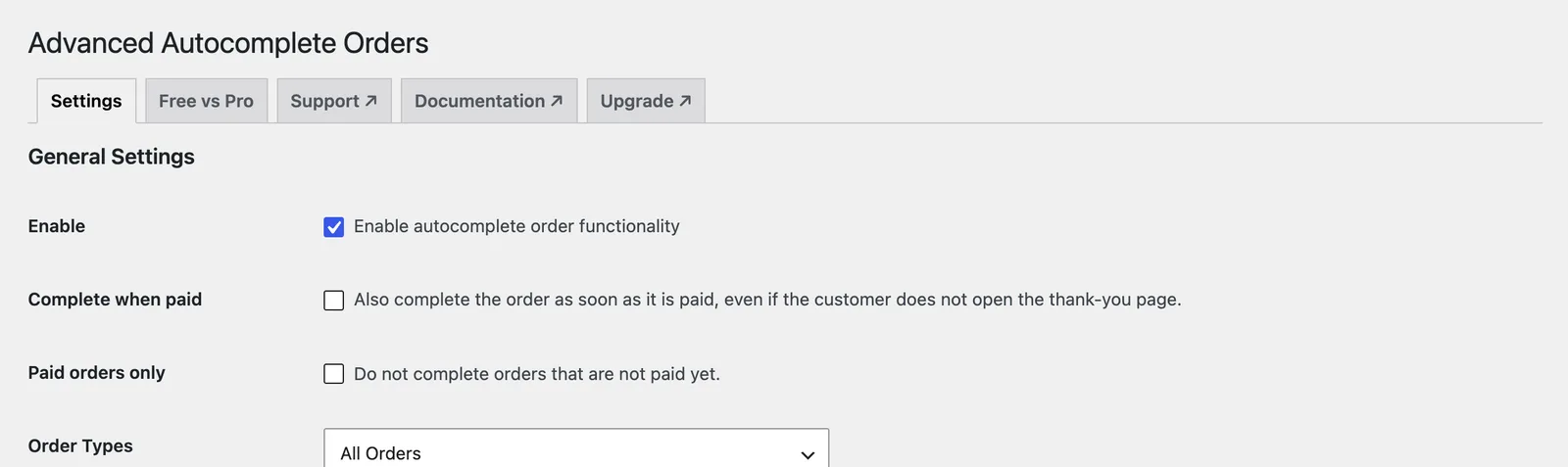
Tick Enable autocomplete order functionality.
Step 3: Complete when paid
Tick Complete when paid to complete orders as soon as payment arrives, even if the customer closes the browser before the thank-you page.
Step 4: Paid orders only
Tick Paid orders only to keep bank transfer, cheque and cash on delivery orders waiting until you mark them paid. Click Save.
Frequently asked questions
Do cash on delivery orders complete?
They complete on the thank-you page unless you turn on Paid orders only or exclude those payment methods.
Still stuck? We’re happy to help.
Contact support